
Hair Color Simulator Online: Test New Hair Colors with AI
Choosing a new hair shade can feel exciting and stressful at the same time. You may love copper on social media, but wonder if it will match your skin tone. You may want to go blonde, yet worry about maintenance or the final result. This is exactly why more people now search for a reliable hair color simulator before going to a salon. A modern simulator helps you test ideas safely, compare options quickly, and avoid expensive mistakes.
Today, an AI-based hair color simulator can give you realistic previews in seconds. Instead of guessing how red, ash brown, honey blonde, or fantasy colors might look, you upload a clear photo and preview multiple styles instantly. In this guide, you will learn how a hair color simulator works, how to use one step by step, which features matter most, and what to check before making a real color change.
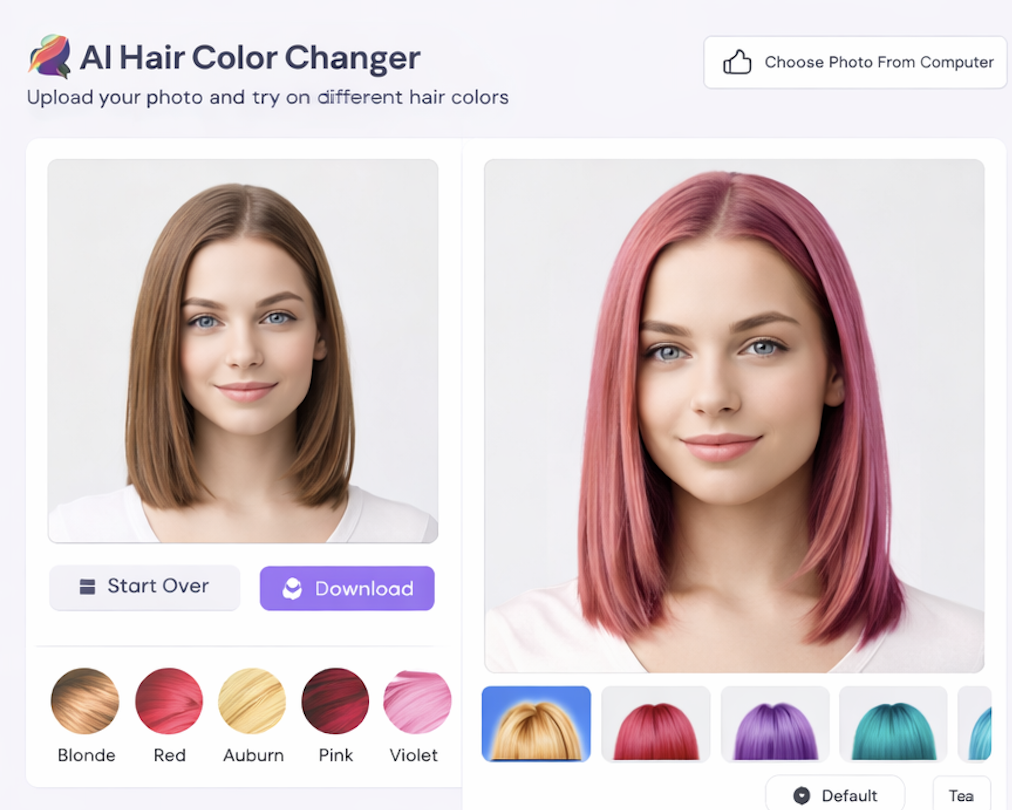
What Is a Hair Color Simulator?
A hair color simulator is a digital tool that lets you virtually try different hair shades on your own photo. Traditional filters simply place color over your hair, which often looks flat and fake. An AI-powered hair color simulator does more than that. It detects hair boundaries, understands highlights and shadows, and applies color while keeping natural texture.
The main advantage of an AI hair color simulator is confidence. You can test natural shades, trendy tones, and bold colors before you spend money at a salon. This makes decision-making easier, especially if you are planning a dramatic change. If you want a deeper explanation of the technology, read this article: What Is AI Hair Color Changer.
In practical terms, a good hair color simulator helps you answer common questions: Will warm brown suit me better than cool brown? Should I choose caramel instead of golden blonde? Is pink too bright for my face? With side-by-side previews, you can compare quickly and choose with more clarity.
How To Use a Hair Color Simulator Online
Using an online hair color simulator is simple, even if you have never edited photos before. Most tools are designed for everyday users and work directly in your browser. You do not need advanced software or technical skills.
Step 1: Choose a clear photo. Use a bright image where your hair is fully visible. Natural light usually produces the best result for any hair color simulator. Avoid dark, blurry, or heavily filtered photos.
Step 2: Upload and select colors. After uploading, the hair color simulator will detect your hair area. Then you can test options such as black, chestnut, auburn, burgundy, platinum, or fashion shades.
Step 3: Compare multiple versions. Try at least three to five similar tones. Many users choose too quickly after one preview, but a smart approach is to compare subtle differences in warmth and depth using the same hair color simulator.
Step 4: Save your favorites. Keep screenshots of your top results. Showing these to your stylist makes communication easier and improves your final salon outcome.
If you want a complete tutorial for beginners, this guide is helpful: Change Hair Color Online Free.
Best Tools For Hair Color Simulator Results
Not every hair color simulator delivers realistic output. Some older tools apply solid color blocks and ignore texture, making hair look unnatural. When selecting a platform, focus on image quality, speed, and color control.
A strong hair color simulator should preserve strand detail. You should still see shine, volume, and natural variation after color is applied. This is crucial for realistic previews, especially on curly or layered hair.
Another important factor is color range. A useful hair color simulator should include natural classics and trendy shades. This allows you to explore both safe and creative styles in one session. Speed also matters. If the tool takes too long, experimentation becomes frustrating. The best solutions generate a new preview in seconds so you can test more looks efficiently.
Finally, check whether the tool is mobile friendly. Many people now use a hair color simulator on phones before salon visits or while discussing style ideas with friends. If you are comparing platforms, this article can help: Best AI Hair Color Changer.
Tips Before Changing Hair Color
Even with a high-quality hair color simulator, your final result depends on your natural base, hair health, and dye process. Virtual previews are excellent for planning, but real-world chemistry still matters.
Match undertone to skin tone. If your skin has warm undertones, warm shades often look more balanced. If your skin is cool, cooler shades may feel cleaner and softer. Use your hair color simulator to compare warm vs. cool versions of similar colors.
Consider maintenance level. Platinum and vivid colors usually require more upkeep. A hair color simulator can help you find lower-maintenance shades that still refresh your look.
Think about workplace and lifestyle. Your ideal color should match daily life, not just trend photos. Testing options in a hair color simulator helps you choose a look you can enjoy long term.
Plan with your stylist. Bring your preview images and ask what is realistic in one session. A preview from a hair color simulator gives direction, while a professional can adjust the formula to your real hair condition.
FAQ
Q1: Is a hair color simulator accurate?
A modern AI hair color simulator is usually very helpful for direction and comparison. It gives a realistic preview, though final salon results can vary based on your current color and treatment history.
Q2: Can I use a hair color simulator for free?
Many platforms offer free access or free trial outputs. You can test several shades with a hair color simulator before deciding whether you need advanced features.
Q3: Which photo works best in a hair color simulator?
A high-resolution image with clear lighting and visible hair works best. The cleaner the photo, the better the hair color simulator can detect details.
Q4: Can a hair color simulator help with bold colors like pink or blue?
Yes. A good hair color simulator is ideal for testing bold tones because these shades are high risk in real life. Virtual previews let you experiment safely first.
Conclusion
A reliable hair color simulator turns guesswork into confident decision-making. Instead of choosing a new shade blindly, you can preview realistic results, compare options, and prepare for your salon visit with a clear plan. Whether you want a subtle refresh or a dramatic transformation, using a hair color simulator first saves time, reduces risk, and helps you find the color that truly suits you.